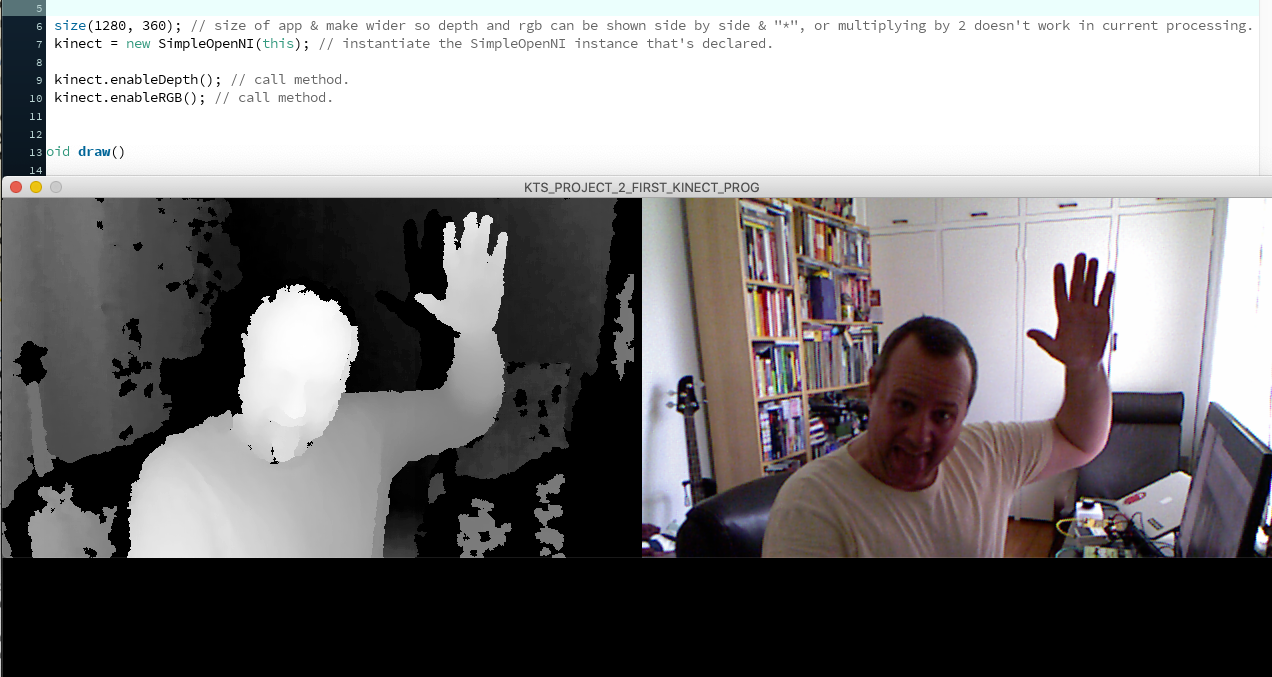
Getting back into Processing, for fun and a creative outlet. To learn, I’m making my way through online tutorials and also trying out my own thing – my goal is to make interactives that respond to input from keyboard, mouse, touch device, or even a Kinect.
Now, making a start with making sure all the necessary Kinect-related libraries, drivers and other bits are installed correctly, or at all. The challenge is that it’s all from a different era e.g., a decade ago, whereby many of the original developers of the open libraries and documentation, let alone Microsoft who developed the Kinect, have moved on to other things, which is fine.
So, my Kinect is working from the command line and can be detected when running the command freenect-glview. And now, after much installing, installing and reinstalling and downloads from GitHub and the Google Code Archive created for the “Making Things See” book, the SimpleOpenNI library for Processing 3.5.3 has been successfully installed and an example sketch runs without error. Amazing stuff. Now, the real fun can start.


import SimpleOpenNI.*; // import the library.
SimpleOpenNI kinect; // declare SimpleOpenNI object and name it kinect.

void setup()
{
  size(1280, 360); // size of app & make wider so depth and rgb can be shown side by side & "*", or multiplying by 2 doesn't work in current processing.
  kinect = new SimpleOpenNI(this); // instantiate the SimpleOpenNI instance that's declared.

  kinect.enableDepth(); // call method.
  kinect.enableRGB(); // call method.
}

void draw()
{
kinect.update(); // get fresh data from the kinect.

PImage depthImage = kinect.depthImage(); // storing in local variables and then passing those variables to image.
PImage rgbImage = kinect.rgbImage();

image(kinect.depthImage(), 0, 0); // ask the library for most recently available depth image & draw at "0,0", or at very top left of our app window.
image(kinect.rgbImage(), 640, 0); // get the colour image from the Kinect and pass it to 640.
}
