Screen captures from 3D point cloud data gathering with Metaio Toolbox for sequences to be used in my augmented contextual instruction on the rear brake caliper. The 3D point cloud data will then be used as tracking technology to place my augments.


Screen captures from the completed image-tracking augmented contextual instruction user experience. The augmented contextual instruction is made up of a sequence of junaio channels that can be browsed in the junaio AR browser. For this example, the channels were browsed using junaio on an iPad.
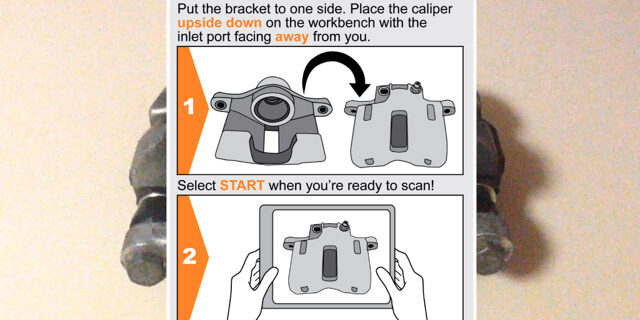
Screen captures from the completed object-tracking augmented contextual instruction user experience. The augmented contextual instruction is made up of a sequence of junaio channels that can be browsed in the junaio AR browser. For this example, the channels were browsed using junaio on an iPad.
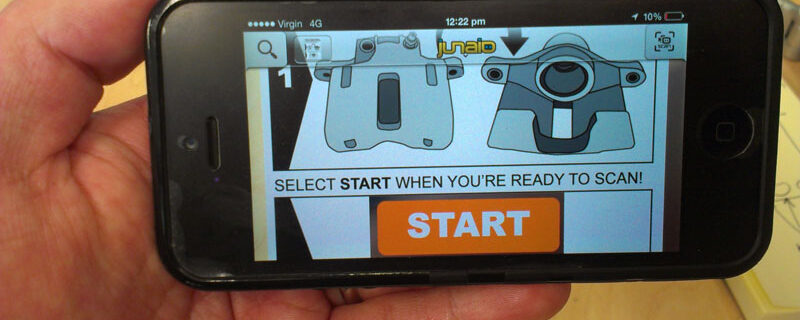
Someone in the Metaio Developer Portal said they’d heard the UI Designer in Creator was made for iPhone4 screens and the created UI design is not responsive to different screen sizes. I think that someone may have heard correctly. Damn!
Save. Upload. Wait. Test. Tweak. Save again. Upload again. Wait again. Test again. Tweak again. Almost there! And another thing. It’s been 11 days since I posted my issue with Z translation of buttons in UI Designer of Metaio Creator 2.6 to the Helpdesk of the Metaio Developer Portal and there hasn’t been one response! …

Fridge magnets, a photo by Rowan Peter on Flickr. “What we plan for the use of something is not necessarily how people will use it and we don’t necessarily dictate how they use it. We open it up and we hope for the best and a lot of the times we are surprised.” It’s still …
Placing geometry in the 3D point cloud in Metaio Creator 2.6 is a little cumbersome, bewildering and often inaccurate. It takes lots of clicking and seemingly random fiddling to place geometry. You also can’t really determine if your geometry is placed correctly within the 3D point cloud until you upload to your channel and then …
Read more “Placing geometry in the 3D point cloud in Metaio Creator 2.6”
Screen captures from my image tracking tests in Junaio for each step of the disassembly process with UI elements. Unfortunately, due to my Z translation problems in UI Designer of Creator 2.6 I had to remove the background image which was placed underneath the buttons. Doing this gives the buttons a floaty and slightly random feel, …
Read more “Testing image tracking with UI elements for each step of the disassembly process”
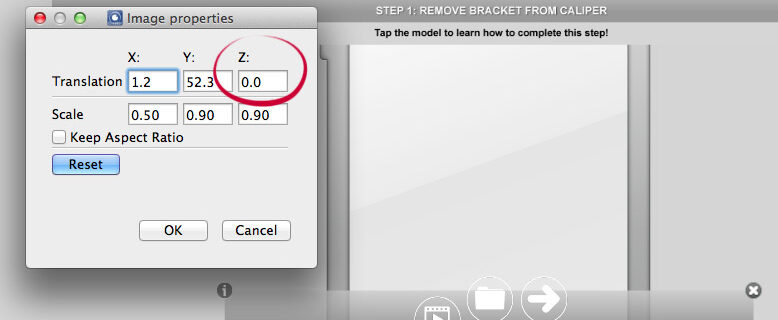
I’m currently wrestling with the correct Z translation of images and buttons in UI Designer of Creator 2.6. I’ve placed some buttons on top of an background image in the UI Designer of Creator and have encountered a problem where the image obscures the buttons and prevents them from working. I’ve checked the Z translation …

One to prepare the required the channel and associated assets and one with the only license to publish. Not the best workflow, but it’s the only way at this time.
Today I attended the third and final scheduled event for the VET Development Centre Specialist Scholarship. The event was a knowledge sharing event where all specialist scholars presented their findings and outcomes from their participation in the program. Unlike Event 1 and Event 2, this event gave everyone the opportunity shared what they’ve learned. The …
Read more “VET Development Centre Specialist Scholarship: Event 3 – Knowledge sharing”
After two days of waiting, my Step 4: Remove piston seal from caliper and Step 1: Remove bracket from caliper channels on Junaio have been made public. This is good news, but I think I went a little early on the publish because I failed to include extras such buttons for the instructional video, learner resources …
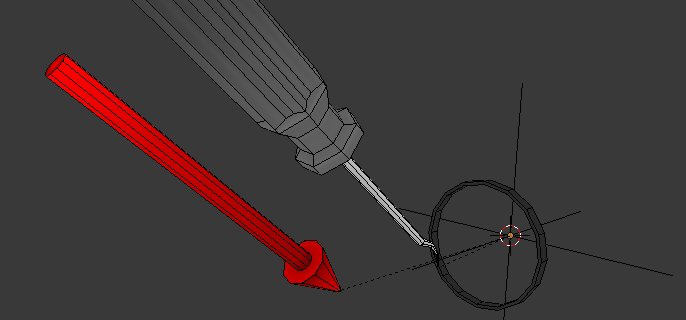
Previsualising the pointed tool, piston seal and rear brake caliper geometry for Step 4: Remove piston seal from caliper stage of the brake caliper augment. Geometry will be exported as FBX from Blender, prepared by FBXMeshCoverter for import into Creator for upload into my Metaio channel for final use as an augment. Figuring out the …
Read more “Geometry for brake caliper augment: Step 4: Remove piston seal from caliper”
Screen captures from 3D point cloud data gathering with Metaio Toolbox for sequences to be used in my augmented contextual instruction on the rear brake caliper. The 3D point cloud data will then be used as tracking technology to place my augments.
These four instructional video are supplementary material for the four augmented contextual instruction sequences I’m developing as part of my VET Development Centre Specialist Scholarship.
Captions can help to provide an equivalent learning experience for viewers who may be hearing impaired, speak other languages or use assistive technology. Captions are also valuable in a teaching and learning context where it may be impractical for learners to wear headphones or play video at high volume in an group training environment such …
Previsualising piston, boot and arrow geometry for Step 3: Remove piston from caliper stage of the brake caliper augment. Geometry will be exported as FBX from Blender, prepared by FBXMeshCoverter for import into Creator for upload into my Metaio channel for final use as an augment. Figuring out the production workflow for each 3D model …
Read more “Geometry for brake caliper augment: Step 3: Remove piston from caliper”
Old early morning lines from the boat harbour at Kwang An beach in Busan, South Korea, a photo by Rowan Peter on Flickr.
I shot this footage of a construction site in Busan, South Korea in 2011. I then did some colour correction a fews years later by adding an Adjustment layer with a Curves (RGB channel and Red channel) and a Hue/Saturation (Reduce Master Saturation) Effect in After Effects. I also used the Stabilise Motion feature of …
Preparing low-poly geometry for augmented contextual instruction in the disassembly and assembly of a vehicle’s rear brake caliper. Augmented contextual instruction is to be prepared in Metaio Creator, published to a Metaio channel and then accessed by learners through the Junaio app. 3D point cloud data is gathered with Metaio Toolbox. This video conceptualises one stage of …
GIF your sassy animal – Parker the cat (Formerly known as Jones), a photo by Rowan Peter on Flickr. I don’t have a cat, but if I did I would call it Parker. Just like the cat that used to live next door. assignments.ds106.us/assignments/gif-your-sassy-animal/
For this prototype, I’m using Metaio Creator image and object recognition features of Toolbox in restrictive Demo Mode to further explore some aspects of my concept of augmented contextual instruction. Unfortunately, in Demo Mode I can’t use the excellent 3D point cloud data captured in Toolbox to prototype all aspects of my augmented contextual instruction. In Demo …
Read more “Prototyping augmented contextual instruction with Metaio Creator (Demo mode) and Toolbox”
The August Animated GIF Challenge: Challenge 4 – Where Did the Soda Go?, a photo by Rowan Peter on Flickr. Just like regular repetitive chicken. Where Did the Soda Go? for Challenge 4 of The August Animated GIF Challenge.
The August Animated GIF Challenge: Challenge 2 – Dancing Jim All Over the World, a photo by Rowan Peter on Flickr. Dancing Jim All Over The World for Challenge 2 of The August Animated GIF Challenge.
The August Animated GIF Challenge: Day 2 – Hurry up and wait, a photo by Rowan Peter on Flickr. The frame rate of the animated GIF does accurately represent the time required to empty the trash. It takes much longer. Hurry up and wait GIF for Day 2 of The August Animated GIf Challenge.
The August Animated GIF Challenge: Day 1 – How do you say thank you?, a photo by Rowan Peter on Flickr. In this scene from The Golden Child, Chandler Jarrell played by Eddie Murphy learns how to say thank you in Cantonese 多謝 (Dwo ze). The use of Cantonese (Should be speaking Mandarin anway?) could …
Read more “The August Animated GIF Challenge: Day 1 – How do you say thank you?”
This is me wrestling with the Minecraft launcher. I’ve downloaded the latest installer, installed the latest version of Java and even got busy in the Terminal as prescribed in the forums. Nuthin’.
Attempting to conceptualise proximity-based level of detail for augmented reality experiences such as Sew, grow and mow that incorporate 3D geometry.
Augmented contextual instruction provides users with procedural demonstrations based on recognisable features and attributes of an object. Augmented contextual instruction could be used in vocational training and assessment contexts. Users can add (record), edit and share their own contextual instruction.
For some reason I couldn’t download Xcode through the App store. I selected the Install button and the little animated icon turned and turned, but nothing happened. This happened time and time again. Damn. So I did quick search and the results were was most helpful. Thanks Den B.
